
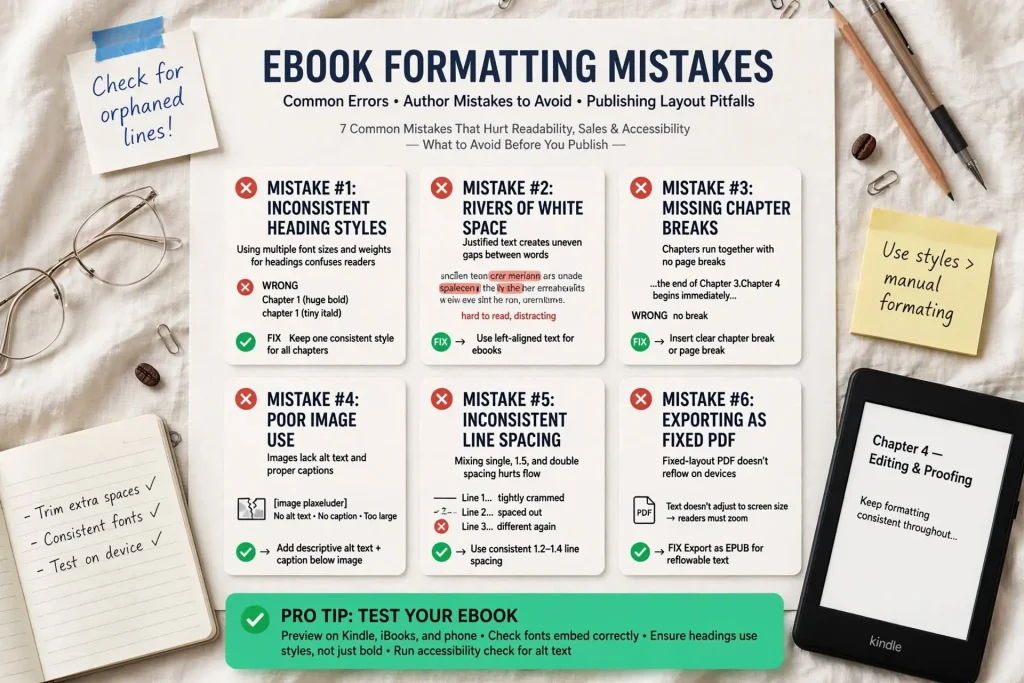
Most ebook formatting errors get discovered by readers rather than by authors. The author never opens their published ebook on multiple devices to see how it actually reads. Readers encounter broken navigation, missing images, weird font rendering, broken links, and reflow problems that affect every minute of their reading experience. The ebook formatting mistakes that frustrate readers usually trace back to specific causes that proper preparation would prevent. Authors who know the common patterns can audit their files before publication and avoid the issues that damage reader experience and review profiles.
This post walks through the specific formatting mistakes that recur most often in indie ebooks, why each one happens, and how to prevent and fix them.
Where Ebook Formatting Goes Wrong
Ebook formatting mistakes happen at specific points in the production process.
The source file creation. Mistakes in Word documents or other source files propagate through everything that follows. Style misuse, manual formatting hacks, inconsistent treatment.
The conversion process. Converting from source to ebook formats can introduce errors. Tool limitations, settings errors, or conversion bugs produce specific patterns of problems.
The platform upload. Different platforms handle files differently. Files that work on one platform may produce errors on another.
The metadata handling. Errors in metadata affect how ebooks display in reader libraries and recommendation systems.
The testing phase. Mistakes get caught at testing or not. Authors who don’t test thoroughly miss problems readers encounter.
The post-publication updates. Updates to published files can introduce new problems or fix existing ones, depending on how handled.
Each stage has specific failure patterns. Authors who know what can go wrong at each stage can audit accordingly.
Broken Table of Contents Errors
The table of contents is among the most commonly broken ebook elements.
The non-functional links. TOC entries that don’t actually link to chapter content. Readers tap and nothing happens.
The wrong link targets. TOC entries that link to wrong locations in the book. Reader gets sent to the wrong chapter.
The missing chapters. Some chapters appearing in TOC, others missing. Inconsistent inclusion.
The auto-generation failures. TOC generators that miss chapters or include wrong elements. Manual review catches what auto-generation misses.
The two-TOC confusion. Embedded TOC (visible page in book) vs navigation TOC (in reader menu). Both should work but often only one does.
The depth mistakes. TOC including too many heading levels (every subsection appears as TOC entry) or too few (only main parts, missing chapters).
The link format errors. TOC links written incorrectly in source HTML. Common when manual TOC creation goes wrong.
Testing TOC functionality on each platform reveals problems before readers find them. Most authors skip this testing despite its simplicity.
Navigation File Mistakes
Beyond the visible TOC, ebooks need proper navigation file structure.
The missing NCX or NAV file. EPUB files need navigation files (NCX for EPUB 2, NAV document for EPUB 3). Files without them have broken reader menu navigation.
The corrupted navigation files. Files exist but contain errors that prevent proper functioning.
The incomplete navigation structure. Navigation files include only some content sections, missing others.
The wrong page break definitions. Page break markers that don’t align with actual content breaks.
The metadata sync issues. Navigation file metadata that doesn’t match book metadata.
The platform-specific navigation requirements. Kindle has specific navigation requirements beyond standard EPUB. Authors using EPUB-only tools may miss Kindle-specific needs.
The Go To Beginning failures. Many Kindle ebooks have “Go To” functions that depend on proper navigation file setup.
Navigation file errors are technical but affect reader experience significantly. Tools that handle navigation files automatically (Vellum, Atticus) prevent most of these issues. Manual EPUB creation needs explicit attention to navigation files.
Reflow Problem Patterns
Reflow problems affect how text displays across different screen sizes.
The forced line breaks. Manual line breaks in source files break reflow at specific points. Lines that should wrap don’t.
The forced page breaks within paragraphs. Page breaks in wrong places that split paragraphs awkwardly.
The fixed text widths. Text widths defined in absolute pixels rather than relative units. Doesn’t adapt to different screen sizes.
The non-reflowing tables. Tables that don’t fit on small screens. Become unreadable on phones.
The fixed image sizes. Images with absolute pixel sizes that don’t scale appropriately across devices.
The columns that don’t collapse. Multi-column layouts that don’t reflow to single column on small screens.
The text that overflows containers. Text formatted to fit specific container sizes that overflow on different screens.
Reflow problems show up specifically on smaller screens. Authors testing only on large tablets miss issues that appear on phones.
Image Display Errors
Images cause specific problems in ebooks.
The missing images. Images that should appear but don’t. File path errors, missing file references, or conversion problems.
The wrong-sized images. Images that display too large or too small for the reading context.
The pixelated images. Images at insufficient resolution that render poorly on high-DPI screens.
The huge file size images. Images at unnecessarily high resolution that bloat ebook file size without quality benefit.
The color rendering on e-ink. Color images on grayscale e-ink devices may not display as intended.
The missing alt text. Images without alt text are inaccessible to screen readers. Accessibility failure affects affected readers significantly.
The orphaned captions. Image captions that get separated from their images during reflow.
The image positioning problems. Images that disrupt text flow inappropriately or appear in wrong locations.
Image handling deserves specific attention rather than treatment as automatic outcome of conversion.
Font Embedding Issues
Font handling creates specific problems in ebooks.
The missing embedded fonts. Books that should use specific fonts but don’t include them. Reader’s default font gets substituted.
The wrong fonts substituted. Reader’s font substitution choices produce unintended visual results.
The font license violations. Including fonts in ebook files without proper licensing creates legal exposure.
The inconsistent font usage. Different fonts in different sections without intentional reason. Looks like mistakes.
The unreadable font choices. Decorative fonts used for body text. Hard to read for extended reading.
The font size problems. Fonts sized inappropriately for body text. Too small produces eye strain. Too large feels childish.
The script font failures. Highly stylized fonts that don’t render well at small sizes or low-DPI displays.
Most ebook tools have specific approaches to font handling. Authors should know their tool’s approach rather than assume fonts will work automatically.
Style Inconsistency Errors
Inconsistent styling within ebooks signals amateur production.
The chapter title variations. Different chapters with different visual treatments. Some bold, some italic, some larger, etc.
The body text inconsistencies. Some paragraphs with first-line indent, others without. Inconsistent paragraph spacing.
The scene break variations. Different visual markers for scene breaks in different chapters.
The header style variations. Section headers treated differently throughout the book.
The list formatting variations. Bulleted and numbered lists styled inconsistently.
The quote treatment variations. Block quotes formatted differently across sections.
The link styling variations. Hyperlinks styled inconsistently or not at all.
The italics and bold inconsistencies. Different applications of emphasis across the book.
Style inconsistencies often trace to source files where authors applied direct formatting rather than using styles consistently. The fix usually requires going back to source files and applying consistent styles.
Cross Platform Rendering Problems
Same file may render differently across reading platforms.
The Kindle-specific issues. Files that work fine in EPUB readers but render poorly on Kindle.
The Apple Books-specific issues. Files with elements that don’t display correctly in Apple Books specifically.
The Kobo rendering issues. Books that look different in Kobo apps than in other reading apps.
The Google Play Books quirks. Specific rendering behaviors in Google’s reading apps.
The legacy device issues. Old Kindle devices may not render newer formatting features.
The mobile vs desktop variations. Same file may look different on phones, tablets, and desktop reader apps.
The font rendering differences. Different platforms render fonts slightly differently.
The color rendering differences. Color reproduction varies across devices and apps.
Cross-platform testing catches issues that single-platform testing misses. The testing effort is worth the time when distributing across multiple platforms.
Special Character Issues
Special characters create specific ebook problems.
The smart quote vs straight quote mismatches. Mixed quote styles within text. Common in manuscripts copied from various sources.
The em dash and en dash confusion. Mixed treatments. Different conversion tools handle these differently.
The accented character problems. é, ñ, ü and similar characters may not render correctly in all readers.
The non-Latin script issues. Books with Greek, Cyrillic, Hebrew, Arabic, or Asian scripts may face rendering challenges.
The mathematical symbol problems. Equations and mathematical notation rarely work cleanly in reflowable ebook formats.
The emoji and symbol issues. Emoji and Unicode symbols may not display consistently across readers.
The encoding errors. Character encoding problems show up as corrupted text or replacement characters.
Special character handling deserves specific attention during source preparation rather than discovery in published files.
Conversion Workflow Mistakes
How files get converted affects final quality.
The Word-to-ebook direct conversion. Common but produces inferior results compared to dedicated tools.
The PDF-to-ebook conversion. PDFs convert poorly to reflowable ebook formats. Should be avoided when possible.
The multiple conversion steps. Each conversion potentially loses quality. Direct source-to-final conversion preserves more than multi-step paths.
The wrong tool selection. Using inadequate tools for the book type.
The skipping of intermediate review. Tools that allow review of intermediate files reveal issues conversion would hide.
The default settings reliance. Default conversion settings may not produce optimal results. Custom settings often improve output.
The conversion verification skipping. Authors who don’t review converted files miss problems conversion introduced.
Workflow discipline matters more than specific tool choice in most cases.
Testing Skipping Mistakes
Insufficient testing causes most ebook formatting issues to reach readers.
The single device testing. Testing only on one device misses issues other devices reveal.
The desktop-only testing. Testing on desktop computers misses mobile-specific issues.
The author-only testing. Authors familiar with their own content miss issues fresh readers would notice.
The visual-only testing. Reading through quickly catches obvious issues but misses functional problems like broken links.
The pre-upload testing only. Testing source files but not testing how converted files actually work on each platform.
The launch-time-only testing. Testing once before launch but not periodically afterward as platforms change.
The category-specific testing skipping. Books with specific features (tables, images, footnotes) need feature-specific testing.
Testing investment is small compared to the time spent producing books. The investment prevents problems that damage reader experience and review profiles.
Format Quality Control as Author Habit
The formatting mistakes covered in this post are all preventable. Authors who develop quality control habits as part of their ebook production workflow tend to avoid these problems. Authors who treat formatting as one-time event followed by publication often encounter the same issues repeatedly across multiple books.
The habit of checking files before publication doesn’t take significant time once developed. Open the file on multiple devices. Verify the table of contents works. Check that images display properly. Confirm fonts render as intended. Test on phones specifically. These checks together take maybe an hour per book. The hour prevents the problems that damage reader experience across thousands of subsequent reads. The discipline of treating formatting quality control as essential rather than optional separates professional ebook production from amateur. Authors building publishing careers benefit from making quality control habit early. The pattern established with first books continues across subsequent books and supports increasingly professional production over time. Readers deserve ebook files that work without distraction from formatting problems. Authors providing that quality through systematic quality control build reputations that careless authors can’t match through writing quality alone.


