
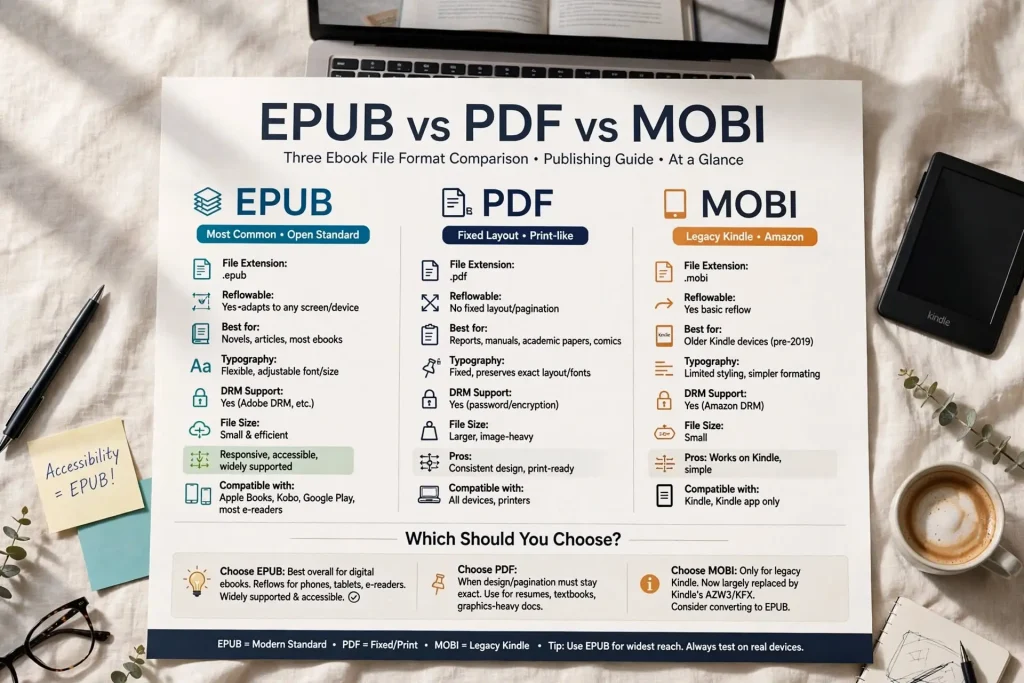
Most authors choosing between ebook formats encounter conflicting advice about which to use. Some sources recommend EPUB universally. Others say PDF is better for certain content. Others mention MOBI as if it’s still a primary choice. The epub vs pdf vs mobi comparison deserves clearer treatment than authors typically encounter. Each format has specific strengths, specific weaknesses, and specific use cases where it actually works best. The right format depends on the specific content and distribution goal rather than universal best practice that applies to all situations.
This post walks through the head-to-head comparison of these three formats across the dimensions that actually matter for publishing decisions.
The Three Main Ebook Formats
These three formats represent different approaches to ebook delivery.
EPUB. The industry-standard reflowable format. Designed for novels and most reflowable content. Open standard.
PDF. The fixed-layout format originally designed for document delivery. Preserves exact appearance across devices. Widely supported but not designed primarily for ebook reading.
MOBI. The legacy Kindle format. Historically used by Amazon. Largely replaced by newer Amazon formats but still encountered in older files and certain workflows.
Each format developed for specific purposes. The comparison shows where each makes sense and where each falls short.
EPUB Strengths & Weaknesses
EPUB is the modern reflowable ebook standard.
The reflow strength. Text adjusts to different screen sizes automatically. Reading on phones, tablets, and ereaders all work cleanly.
The accessibility strength. Strong screen reader support, semantic markup, and other accessibility features built in.
The platform support breadth. Used by Apple Books, Kobo, Google Play Books, Barnes and Noble Press, and most non-Amazon platforms.
The Amazon acceptance. Amazon accepts EPUB uploads even though it converts to Amazon’s own formats for delivery.
The styling flexibility. CSS-based formatting allows substantial customization.
The metadata support. Strong metadata handling for proper library and discovery integration.
The version updates. EPUB 3 adds multimedia, interactive features, and other modern capabilities beyond EPUB 2.
The creation tool support. Many tools create EPUB including Vellum, Atticus, InDesign, Calibre, and others.
Weaknesses include occasional rendering inconsistencies across different reader apps. Same EPUB may look slightly different in different readers. Fixed-layout EPUB exists but isn’t EPUB’s primary strength.
EPUB handles novels and most non-illustrated nonfiction extremely well. The format should be default for most ebook publishing.
PDF Strengths & Weaknesses
PDF was designed for document delivery rather than ebook reading specifically.
The fixed-layout strength. Pages appear identical across devices. Exact formatting preservation.
The layered layout support. Multi-column layouts, sidebars, detailed page designs all work in PDF. EPUB struggles with these.
The image-heavy content support. Cookbook layouts, art books, illustrated books work well in PDF because layout matters.
The professional document feel. Some content benefits from looking like documents rather than reflowing ebooks.
The universal support. Nearly every device can open PDF without special apps.
The print compatibility. PDFs print directly without conversion needed.
The DRM options. Several DRM systems work with PDF.
Weaknesses include poor mobile reading experience. PDFs on phones require zooming and scrolling. The fixed layout doesn’t adapt to small screens.
The accessibility limitations. Screen readers handle PDFs less reliably than EPUB. Text extraction from PDF can be problematic.
The file size considerations. PDFs often run larger than equivalent EPUB files.
The platform fit. Major ebook platforms accept PDF but treat it as alternative format rather than primary. Sales typically lower than equivalent EPUB.
PDF works well for fixed-layout content (cookbooks, art books, certain technical books) but poorly for novels and most reflowable content.
MOBI Strengths & Weaknesses
MOBI is largely legacy at this point but still appears in workflows.
The Kindle compatibility. Originally Amazon’s primary format. Older Kindle devices and apps still read MOBI.
The reflowable text support. Like EPUB, supports text reflow for different screen sizes.
The simpler structure. Less complicated than EPUB in some ways.
The legacy installed base. Many existing Kindle books exist as MOBI files.
Weaknesses include outdated capabilities compared to newer formats. CSS support more limited than EPUB. Modern typography features missing.
The Amazon transition away. Amazon has moved to AZW3 and KFX for new content. MOBI’s role has diminished significantly.
The platform limitations. Outside Amazon’s ecosystem, MOBI has limited support.
The conversion necessity. Authors typically need to convert FROM MOBI to other formats for distribution beyond Amazon.
For new ebook publishing, MOBI shouldn’t be the starting format. EPUB or platform-specific formats serve better. MOBI matters mostly for handling existing legacy files.
Compatibility Comparison
Each format works differently across devices and platforms.
EPUB compatibility. Reads on Apple Books, Kobo, Google Play Books, Barnes and Noble Press, most ereaders except Kindle (without conversion), most reading apps.
PDF compatibility. Reads on virtually every device. Universal support across phones, tablets, computers, e-readers.
MOBI compatibility. Reads on Kindle devices and apps. Limited support elsewhere without conversion.
The cross-platform implication. EPUB has broadest ebook-platform support. PDF has broadest universal device support. MOBI has narrowest current support.
The conversion realities. Converting between formats works with varying quality. EPUB to PDF often works cleanly. PDF to EPUB often requires significant reformatting.
The reader app variations. Same EPUB looks slightly different in different apps. Same PDF looks identical across apps. Same MOBI varies less than EPUB but more than PDF.
For authors prioritizing maximum reader compatibility, EPUB for ebook stores plus PDF for direct sales typically covers most cases.
Creation Process Comparison
Creating each format requires different tools and processes.
EPUB creation. Many tools support EPUB creation. Vellum, Atticus, Calibre, Sigil, InDesign, others. The tool ecosystem is mature.
PDF creation. Even more tools support PDF. Word, Pages, InDesign, web browsers, design tools. Universal creation support.
MOBI creation. Older tools (KindleGen) supported MOBI creation. Newer tools focus on EPUB with Amazon handling conversion.
The quality variations. Different tools produce different quality output. Word-to-EPUB often weaker than Vellum-to-EPUB. Same applies to other formats.
The learning curves. Some tools (InDesign, Sigil) have steeper learning curves. Others (Vellum, Atticus) prioritize ease of use.
The workflow integration. Creating one format often enables conversion to others. Strong source files convert better than weak source files regardless of destination format.
The professional service options. Authors can hire professionals to handle format creation. Costs vary significantly.
For most authors, learning one strong tool (Vellum for Mac, Atticus for cross-platform) handles ebook creation across formats adequately.
Quality Comparison
The quality of reader experience varies across formats.
EPUB reading quality. Strong on dedicated ereaders. Good on phones and tablets through proper reader apps. Reflow works as designed.
PDF reading quality. Excellent on desktop and large tablets where fixed layout works. Poor on phones where the fixed layout fights against small screen.
MOBI reading quality. Good on Kindle devices and apps. Limited features compared to newer formats.
The typography quality. EPUB 3 supports advanced typography. PDF preserves whatever typography was used at creation. MOBI typography support more limited.
The illustration handling. PDF handles images precisely. EPUB image handling depends on tool and platform. MOBI image support more limited.
The interactive features. EPUB 3 supports interactivity. PDF supports some interactive features. MOBI minimal interactivity.
The accessibility quality. EPUB strongest. PDF varies based on creation quality. MOBI more limited.
For most reading contexts, format choice affects quality. Matching format to content type produces better outcomes than format-agnostic publishing.
Use Case Recommendations
Specific use cases match specific formats best.
Novels. EPUB is the right choice. Reflow matters significantly for reading on different devices.
Most nonfiction. EPUB usually works. Reflow benefits readers without sacrificing meaningful capability.
Cookbooks. PDF often better. Specific layouts matter for usability.
Art books and photography books. PDF often better. Fixed layout preserves intent.
Children’s picture books. Either depending on content. Picture-heavy fixed-layout content suits PDF. Text-with-some-illustration suits enhanced EPUB.
Technical books with complicated layouts. PDF often better for specific complicated layouts. EPUB works for reflowable technical content.
Reference books. Depends on layout requirements. Reflowable reference works as EPUB. Fixed-layout reference works as PDF.
Comics and graphic novels. Specialized formats (CBR, CBZ) often better than either EPUB or PDF for this content.
Documents for download from author websites. PDF often works well for marketing materials, samples, and other one-off downloads.
Amazon Kindle distribution. Upload EPUB. Amazon handles Kindle-specific format conversion.
Apple Books, Kobo, Google Play Books. EPUB direct upload.
Direct ebook sales. EPUB for most content. PDF for fixed-layout or document-style content.
Choosing Formats by Use Case
The format choice should follow from content type and distribution goals rather than from universal preferences. EPUB serves most ebook publishing well because most ebook content is reflowable text that benefits from format flexibility. PDF serves fixed-layout content well because preserving exact appearance matters for that content. MOBI serves limited current use cases and shouldn’t be the primary focus for new ebook publishing.
The matching of format to use case produces better outcomes than ideological commitment to single format. Authors who use EPUB for novels and PDF for cookbooks tend to produce better reader experiences than authors who insist on single-format approach regardless of content. The few minutes of thinking about which format serves specific content best produces returns across years of subsequent sales of that content. The format decisions reflect serving readers rather than serving operational preference. Readers wanting to read novels on phones benefit from EPUB. Readers wanting to cook from a cookbook benefit from PDF preserving the recipe layout. Readers wanting to browse photography books benefit from PDF preserving the image presentation. Authors who think about reader needs and match format choices to those needs tend to produce ebooks that satisfy readers across reading contexts. The format choices that result tend to support sustainable sales better than choices made without considering specific content and reader requirements.


